Product · Invoicing Software · Web, iPhone & iPad
HeyHippo
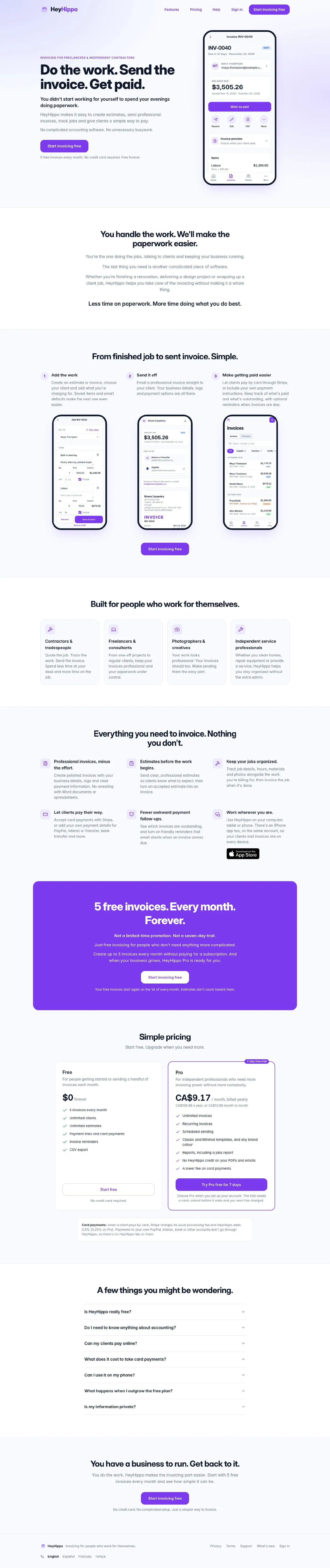
An invoicing app for small businesses and tradespeople: estimates, invoices, jobs and card payments, on the web and on iPhone and iPad.
At a glance
The problem
Small businesses and trades need to send an invoice and get paid without learning accounting software.
What we built
A web app and native iPhone and iPad apps sharing one account, with invoices, estimates, jobs, automatic reminders, and card payments through the business's own Stripe account.
What they can do now
Businesses send an invoice from whichever device is in their hand and get paid by card or straight to their own accounts. It's live, with a free plan and a Pro subscription.
Evidence
Live at useheyhippo.com and on the App Store.
Got a problem like this? Get a free workflow review
The challenge
A tradesperson or a one-person studio needs to send an invoice from wherever they are, get paid by card or e-Transfer, and stop chasing late payments. They don't need an accounting system to do it, and they won't sit through a setup screen to find out.
Our own product: designed, built and run by Bunker41. It's marketed on its own at useheyhippo.com.
What we built
- A web app that installs on Android phones and desktops, and keeps working offline
- Native iPhone and iPad apps, on the App Store
- Accounts with server sync, so the same invoices are on every device
- Card payments through each business's own Stripe account, including Apple Pay and Google Pay
- PayPal, Venmo, Cash App, Zelle, Interac and bank details shown on the invoice
- Automatic reminders on the due date, then 3 and 10 days later
- Jobs with scheduling, hours, parts and photos, turned into an invoice when the work is done
- Recurring invoices that send themselves, on Pro
- CSV export
- Marketing site, pricing and App Store listing
Highlights
What makes it work
The Money Goes to the Business
Card payments run through each business's own Stripe account, and the other options are the business's own PayPal, e-Transfer or bank details. Payouts land in the business's own accounts.
Reminders That Run Themselves
An unpaid invoice gets a polite reminder on its due date, then 3 and 10 days later. Nobody has to remember to chase.
One Account, Every Device
The same invoices on a phone at the job, an iPad at the counter and a desktop at the end of the day. The web app installs like an app and keeps working when the connection drops.
Behind the scenes
How we approached it
Start With the Invoice
The first thing anyone needs is a sent invoice, so that takes about a minute: pick a client, add what you did, send. Estimates, jobs and reports sit behind that loop rather than in front of it.
Change the Foundations When the Product Needs It
HeyHippo started on iCloud, with no account at all. Version 2.0 moved everyone's data into HeyHippo accounts with server sync, because a web app, card payments and more than one device needed it. It's the same kind of move a business makes when it outgrows a spreadsheet.
Run It, Don't Just Ship It
Updates ship regularly, with a public What's new page, and support questions come to us. Building software is the start; keeping it working for the people who rely on it is the job.
Got a problem worth fixing?
Tell us what’s slowing the business down. The workflow review is free, and you’ll know the price before any work starts.